IBM InfoSphere DataStage on AWS
IBM InfoSphere DataStage is a data integration, extract, transform, and load (ETL) tool that enables users to move and transform data between operational, transactional, and analytical target systems.
Data transformation and movement is the process by which source data is selected, converted, and mapped to the format required by target systems. The process manipulates data to bring it into compliance with business, domain, and integrity rules, and with other data in the target environment.
If you want to Gain In-depth Knowledge on DataStage, please go through this link DataStage Training
This reference deployment provides AWS CloudFormation templates to deploy InfoSphere DataStage on a new OpenShift cluster. This cluster includes:
- A Red Hat OpenShift Container Platform cluster created in a new or existing virtual private cloud (VPC) on Red Hat Enterprise Linux (RHEL) 7.7 instances, using the OpenShift on AWS Quick Start. See the OpenShift on AWS deployment guide for details about the underlying OpenShift deployment architecture.
- A GlusterFS distributed file system that uses encrypted Amazon Elastic Block Storage (Amazon EBS) volumes.
- Scalable OpenShift worker nodes running InfoSphere DataStage.
- A Microsoft Windows–based DataStage Client machine.
Architecture
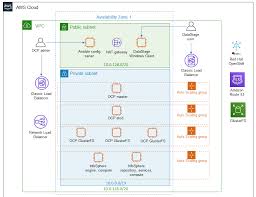
Deploying this Quick Start for a new virtual private cloud (VPC) with default parameters builds the following InfoSphere DataStage environment in the AWS Cloud.

The Quick Start sets up the following:
- A highly available architecture that spans three Availability Zones.
- A VPC configured with public and private subnets according to AWS best practices, to provide you with your own virtual network on AWS.
- In the public subnets, managed network address translation (NAT) gateways to allow outbound internet access for resources in the private subnets.
- In a public subnet, a Linux Ansible config server Amazon Elastic Compute Cloud (Amazon EC2) instance that also serves as a bastion host to allow inbound Secure Shell (SSH) access to EC2 instances in private subnets.
- In a public subnet, an EC2 instance (Windows Server 2012 R2) running the InfoSphere DataStage thick client. Inbound SSH to EC2 instances in the public and private subnets are also possible from this instance using PuTTY.
- In the private subnets: – Three OpenShift Container Platform master instances in an Auto Scaling group. – Three OpenShift Container Platform etcd instances in an Auto Scaling group. – Three OpenShift Container Platform GlusterFS instances in an Auto Scaling group that use encrypted Amazon Elastic Block Storage (Amazon EBS) volumes. – Two OpenShift worker nodes in an Auto Scaling group that, combined, contain InfoSphere DataStage engine, services, and metadata repository tiers.
- A Classic Load Balancer spanning the public subnets for accessing DataStage from a web browser and from DataStage Client instances. Internet traffic to this load balancer is only permitted from ContainerAccessCIDR.
- A Classic Load Balancer spanning the public subnets for accessing the OpenShift Container Platform master instances. Internet traffic to this load balancer is only permitted from RemoteAccessCIDR.
- A Network Load Balancer spanning the private subnets, for routing internal OpenShift API traffic to the OpenShift Container Platform master nodes.
- An Amazon Route 53 private hosted zone for resolving internal Domain Name System (DNS) queries.
Single-AZ mode
This Quick Start can be deployed as a non-highly-available cluster that spans a single Availability Zone. This option is enabled by setting Non-HA for the ClusterAvailability parameter when launching the Quick Start.
Planning the deployment
Specialized knowledge
This Quick Start assumes basic familiarity with the use of the InfoSphere DataStage application, including a browser-based Designer (thin client), a Windows-based Designer (thick client), and a basic awareness of the components of a DataStage installation. If you’re new to InfoSphere DataStage, see the Additional resources section.
Take your career to new heights of success by enrolling Live free demo on AWS Online Training
AWS account
If you don’t already have an AWS account, create one at https://aws.amazon.com by following the on-screen instructions. Part of the sign-up process involves receiving a phone call and entering a PIN using the phone keypad.
Technical requirements
You must provide your IBM Customer Number (ICN) and the part numbers of the software licenses purchased, as noted in your Proof of Entitlement (PoE) certificate.
Red Hat Enterprise Linux (RHEL) 7.7 is used for the OpenShift EC2 instances in this deployment. Other distributions aren’t currently supported. The DataStage Windows Client instance is deployed from a private Amazon Machine Image (AMI) based on Windows Server 2012 R2, and the bastion host instance runs Amazon Linux. Your AWS account is given launch permission for the private AMI when the Quick Start is deployed.
Before you launch the Quick Start, your account must be configured as specified in the following table. Otherwise, deployment might fail.
 Tech Programmers